
Contractor Estimate & Invoice
GetCostBusiness
4.6326.00 Reviews
- Version
- 1.827
- Installs
- 100.00K
- Age Rating
- Everyone
Screenshots
Our Review of Contractor Estimate & Invoice
 Analysis by Appyee
I judge a contractor tool by whether it helps me keep a job moving without turning a quick customer conversation into an office task. Contractor Estimate & Invoice is built around that practical need: estimates, invoices, payments, timesheets and scheduling for a team. My overall take is that it makes the most sense for small contractors who want everyday business tasks gathered in one place, especially when they work away from a desk. It is less convincing for anyone expecting a full accounting system or a highly customized project-management platform.
A focused business tool, not a replacement for everything
In the business-app category, this app from GetCost has a clear purpose: bring routine contracting paperwork and team coordination onto a phone. The distinction matters. It is not simply a calculator for job quotes, but I would also avoid treating it as a complete substitute for bookkeeping, payroll or a dedicated scheduling system. Its value depends on whether estimates and invoices are the administrative bottleneck you most want to reduce.
The app is free to install, is rated for Everyone, and has a 4.6 average from around 2,800 ratings, with over 100,000 installs. Those figures suggest that it has found an audience among people who need contractor-focused tools, though they cannot tell me whether its workflow will fit a particular trade or business. The current version is 1.780, and it runs on Android 5.0 or later. Optional in-app purchases range from $9.99 to $599.99 per item, so I would check what a paid option covers before building a business process around it.
Why estimates can make the strongest first impression
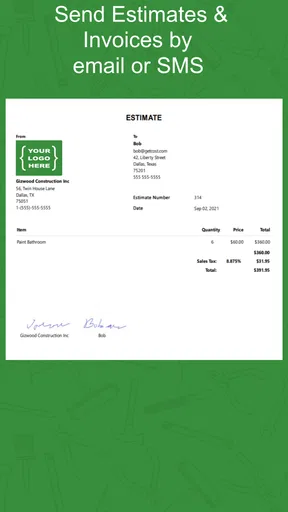
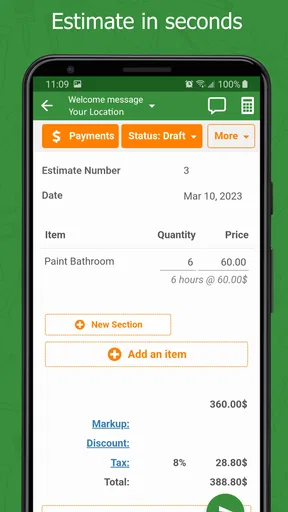
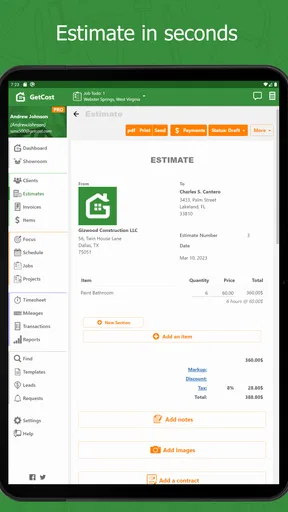
For a contractor, a quote is more than a total: it is a shared understanding of what work is included. The ability to lay out line items, quantities and taxes can make an estimate easier to discuss than a single lump sum. I would use that structure to separate labor from materials or distinguish the main job from optional work, so the customer can see what changes if the scope changes. Adding business branding can also make the document feel more like a deliberate proposal than a note sent from a phone.
A useful habit is to build the estimate while the details are fresh, then review quantities and tax treatment before sending it. That small pause is especially valuable on jobs where a customer may compare alternatives or ask for a change. A polished document does not guarantee a correct price; the contractor still needs to make sure the quantities, assumptions and scope are accurate. The app can help present those decisions clearly, but it cannot make them on your behalf.
From approval to payment follow-up
Turning an estimate into an invoice is a sensible bridge between agreeing on work and asking for payment. It can reduce retyping and the chance that the final bill drifts away from the accepted quote. Sending an invoice by email and being able to see whether it was viewed are useful for follow-up, but I would not mistake a view indicator for confirmation that a client has approved the amount or paid it. A quick call or message may still be the right next step.
Payment tracking gives a small business a way to keep an eye on what is outstanding alongside its project records. For a sole contractor, that can be more practical than trying to remember which customer needs a reminder after a full day on site. I would still keep a regular bookkeeping routine and reconcile payments against the records used for taxes and accounts. A payment status inside a work app is helpful operationally, but it should not automatically become the only financial record a business relies on.
Where timesheets and scheduling fit into the day
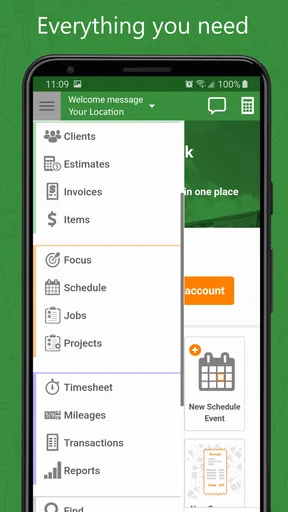
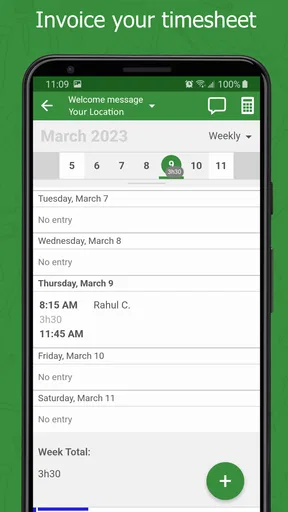
The team-oriented scope is important for contractors who coordinate more than their own calendar. Scheduling can help make upcoming work visible, while timesheets can connect labor records to the jobs that consume that time. The practical payoff is not just having more fields to fill in: it is being able to look back at a job and ask whether the planned work and the time spent still make sense together.
One concrete workflow I would try is to review the next day's appointments before leaving the site, check which client or job each task belongs to, and record team time while the work is still easy to recall. This makes the app more useful than a pile of separate reminders and handwritten notes, but it also depends on consistent habits. If one team member records time later from memory and another does it immediately, the information may not be equally reliable. A shared tool helps organize the process; it does not remove the need to agree on how the team will use it.
A realistic day on the job
Imagine visiting a customer to discuss a repair, then learning that they may want an extra item included. I would note the work as separate estimate lines rather than quietly folding the extra into the total. That gives the customer a clearer choice and gives me a better reference if the scope changes. Once the work is agreed, converting the estimate to an invoice can keep the paperwork aligned, and the project record gives me a place to check payment status and remember a follow-up.
The advantage in that scenario is continuity: the quote, the job and the payment follow-up are related parts of the same business task rather than disconnected scraps of information. The trade-off is that a phone workflow works best when details are entered carefully at each step. If I am rushing between jobs, I would rather save a draft or make a note to verify a figure than send an estimate with an unconfirmed quantity. Speed is useful only when it does not make the paperwork less dependable.
How it compares with familiar alternatives
The usual alternative for a very small operation is a spreadsheet, a document template and a calendar. That approach can be cheap and flexible, and it may be enough if the contractor handles only a few jobs and rarely needs to coordinate a team. Its weakness is the manual handoff: customer details or amounts can be copied inconsistently, and payment reminders may live somewhere separate from the invoice. This app is more appealing when bringing those recurring tasks together is worth more than having complete freedom to design every document.
Compared with a general invoicing app, a contractor-focused workflow has a more natural place for estimates, job organization, team time and scheduling. A general invoice tool may be preferable if the business mainly needs accounting integrations, detailed financial reporting or a familiar system already used by an accountant. Likewise, a larger company with complex dispatch, inventory or approval rules may outgrow a mobile-first contractor tool. I would choose based on the bottleneck: if it is creating and following up on job paperwork, this app is a reasonable candidate; if it is financial control across a larger operation, I would compare specialist systems first.
Setup choices that prevent headaches later
When starting out, I would enter a few representative jobs before moving every customer record into the app. Try one straightforward quote and one job with optional work, then see whether the line-item structure communicates the difference clearly. This is a practical test of fit, not just a test of whether the buttons are easy to find. It can reveal whether the way you price work maps naturally to the app before the whole team depends on it.
I would also settle on consistent naming for clients and projects. For example, using a recognizable customer name together with a short job description makes it easier to scan records later than relying on vague labels such as “repair” or “new work.” Agree on a simple team routine for recording hours and updating payment status as well. These small conventions are not flashy features, but they make a shared business app more useful and reduce the risk of duplicate or hard-to-find records.
Limits worth weighing before relying on it
The broad feature set comes with a learning trade-off: estimates, billing, team time and scheduling are different workflows, and a contractor who needs only one of them may find a narrower app easier. A business should also consider whether its existing accounting process can work alongside the app without repeated entry. Before making it the central record for customer work, I would test the parts that matter most to the business and confirm that the outputs suit its customers and internal routine.
Cost deserves attention too. Although installation is free, in-app purchases run from $9.99 to $599.99 per item. That is a wide range, so I would not assume that every useful capability is included at no charge or that every business will need a paid option. Check the app’s current purchase details against the features you actually expect to use, and weigh that against the cost and effort of your current spreadsheet or invoicing setup. The right comparison is the total workflow, not just the initial download.
Who I would recommend it to
I would put this on the shortlist for an independent contractor or a small team that prepares estimates, invoices clients, tracks payments and wants scheduling or timesheets close to the job records. It is particularly promising if paperwork gets delayed because it is split between a phone, a notebook and a desktop document. The Android version’s minimum OS requirement is 5.0, which makes it usable on a broad range of Android software versions, while the app is also available on iOS.
I would skip it if I were looking for a comprehensive accounting suite, if I had no need for contractor-style estimates, or if my business already runs smoothly through established systems that handle billing and books together. I would also think twice if the team is unwilling to enter information consistently: a shared place for incomplete records is not automatically better than a simple process everyone follows. The app is most compelling when the business is ready to use its connected workflow rather than merely install another tool.
Putting the workflow to work
Diving into the Contractor Estimate & Invoice app feels like a breath of fresh air. The installation process is super straightforward, and within minutes, you're all set to start managing your projects. The user interface is clean and intuitive, making it a breeze to navigate through different features. Whether you're tech-savvy or a complete newbie, this app has got you covered.
Creating Estimates: Precision at Your Fingertips
One of the standout features of this app is its ability to create detailed estimates. You can easily add line items, adjust quantities, and apply taxes, all with a few taps. The app also allows you to customize the estimates with your business logo and branding, giving it that professional touch. It’s like having a personal assistant that ensures everything is precise and polished.
Invoicing Made Simple
Gone are the days of manually creating invoices. With this app, generating invoices is as simple as converting an estimate with just one click. Plus, you can send invoices directly to your clients via email, saving time and paper. The app's tracking system lets you see when an invoice has been viewed, so you're always in the loop.
Project Management: Stay Organized
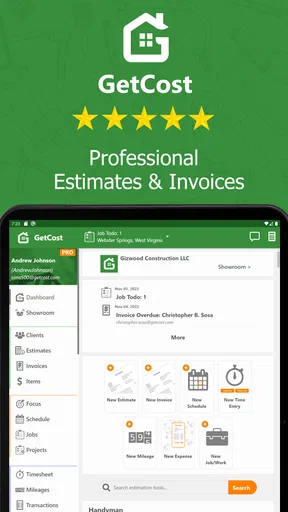
Keeping track of multiple projects can be a headache, but the app’s project management feature keeps everything organized. You can manage clients, track payments, and even set reminders for follow-ups. The dashboard gives you a quick overview of all ongoing projects, ensuring you never miss a beat.
Mobile Flexibility: Work on the Go
The beauty of the app is that it allows you to work from anywhere. Whether you're at the site, in the office, or on the move, you can access all your information seamlessly. The app is available for both Android and iOS, ensuring compatibility with most devices.
Security and Support: Peace of Mind
Security is a big deal, and this app doesn’t take it lightly. Your data is securely stored and backed up, giving you peace of mind. Plus, if you ever run into issues or have questions, the customer support is top-notch. They’re responsive and ready to help, ensuring you’re never left hanging.
In conclusion, if you’re a contractor looking to simplify your business operations, the app is a fantastic tool. It’s efficient, user-friendly, and packed with features that make managing estimates and invoices a breeze. So, why not give it a try and see how it can transform your workflow?
My recommendation
My verdict is favorable, with a clear condition: I would choose it for the practical connection between job estimates, invoices and team organization, not because I expect one app to solve every business problem. Its 4.6 average and 2.8 thousand ratings are encouraging context, but the best test is whether a real quote-to-payment routine feels simpler after trying it. Start with one or two current jobs, check the paid options carefully, and decide from the actual day-to-day fit. For a contractor tired of scattered paperwork, that is a worthwhile trial; for a business needing deep accounting or highly specialized operations, another tool may be the better foundation.
Verdict
Strengths of Contractor Estimate & Invoice
- User-friendly interface for quick estimates.
- Customizable templates for various projects.
- Integration with accounting software.
- Real-time collaboration with team members.
- Supports multiple currencies for global use.
Limitations of Contractor Estimate & Invoice
- Limited offline functionality.
- Subscription required for premium features.
- Occasional syncing issues reported.
- No direct customer support chat.
- Lacks advanced analytics tools.
Similar Picks in This Category
View All
LinkedIn: Community & Network
LinkedIn3.8

Zoom Workplace
zoom.com4.1

Microsoft Teams
Microsoft Corporation4.6

Meta Business Suite
Meta Platforms, Inc.4.6

Webex Meetings
Cisco Systems, Inc.4.5

TeamViewer Remote Control
TeamViewer4.4
Frequently Asked Questions
What features does the Contractor Estimate & Invoice app offer?
The app provides a comprehensive suite of tools for creating detailed estimates and invoices. Users can customize templates, track project expenses, and manage client information. It also includes features for sending invoices directly via email and receiving payments online, streamlining the financial management process for contractors.
Is the Contractor Estimate & Invoice app user-friendly for newcomers?
Yes, the app is designed with an intuitive interface that is easy to navigate, even for users with little technical experience. It includes step-by-step guides and tutorials to help new users quickly understand how to create and manage estimates and invoices effectively.
Can I use the app offline, or do I need an internet connection?
The Contractor Estimate & Invoice app allows users to work offline, enabling them to create and edit estimates and invoices without an internet connection. However, features like sending invoices via email or syncing data across devices require internet access.
Does the app support multiple currencies and tax rates?
Yes, the app supports multiple currencies and tax rates, making it suitable for contractors working internationally or in different regions. Users can easily configure the app to apply the correct currency and tax settings for each client, ensuring accurate financial documentation.
How secure is my data on the Contractor Estimate & Invoice app?
The app prioritizes user data security by employing robust encryption methods to protect sensitive information. It also offers secure cloud storage options, allowing users to back up their data safely and access it from different devices, thus ensuring that financial information remains confidential and protected.
